
Win Storm - Online Help


Win STORM is in beta stage. While we're debugging the application, please report any bugs you find through our Contact form.
Win Storm user interface
Win STORM has a simple UI made of a title bar and six different sections that can be accesed by clicking the tile buttons in the left side of the GUI. We call these sections "pages" and not tabs in these tutorials, to distinguish them from other tabs that exist inside some of the sections themselves.
You can find the help pages for each frame below.
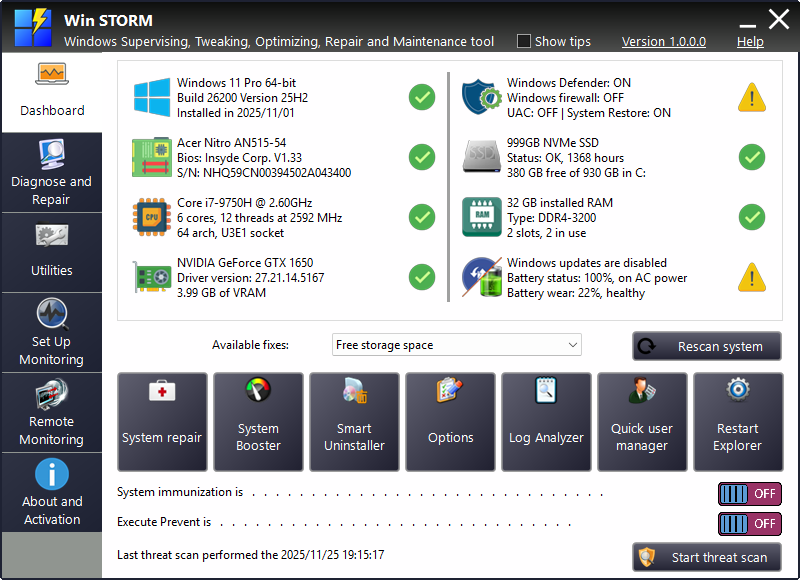
The title bar contains a few controls, besides the usual Minimize and Close buttons:
- Show tips - If this checkbox is ticked, a tooltip is displayed when you switch to a different page, This is intended to help you get started using Win STORM.
- Version link - Takes you to the change log page, which is not available yet.
- Help link - takes you to the current frame's help page.
| Help pages for the main application: | ||
|---|---|---|
| Dashboard | Diagnose and repair | Utilities |
| Set up monitoring | Remote monitoring | About and activation |
| System scan | Remote commands | Activate license |
| Other help pages and tutorials, in alphabetical order: | ||
|---|---|---|
| Activate a product license | Automatically load settings | Change log |
| Cloud Sync | Command line reference | Context menu |
| Create SFX package | Download and install | File signatures |
| Keyboard usage | Script commands | Uninstall |
| UVK log | VirusTotal analysis | |
