
Win STORM Help - About and Activation


Win STORM is in beta stage. While we're debugging the application, please report any bugs you find through our Contact form.
The 'About and Activation' Win STORM page displays some information about the current application's version and lets you activate a PRO or a Trial license. Both these licenses unlock all Win STORM features, including branding the application to your likes, using your own icon, logo, title, description and website URL.
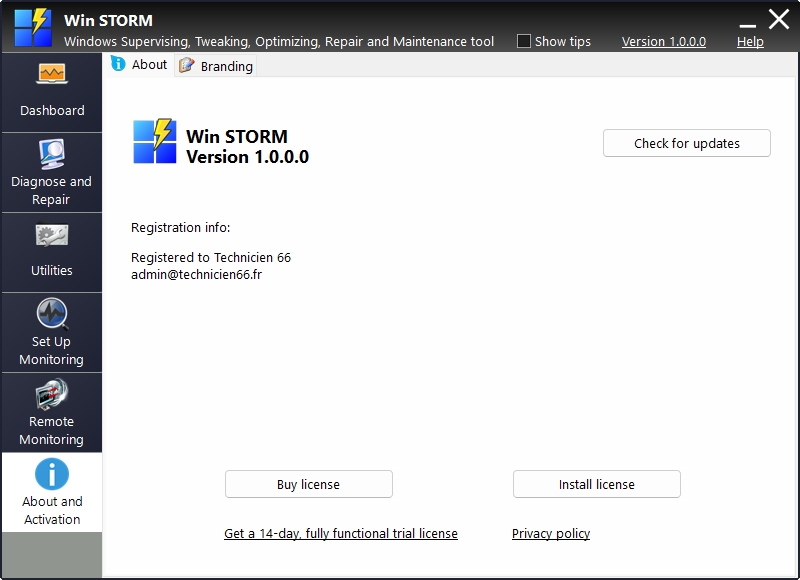
This page contains two tabs: About and Branding. Switch to the desired tab at the top of the frame.
About
In the top left area of the About tab, you can see the application version you're using, and to the right, you have a button named Check for updates. Click this button to update the app to the latest version available.
In the center part you see registration info, and at the bottom, you have two buttons and two links:
- Buy license - this button takes you to the license purchase page.
- Install license - this button lets you locate a downloaded license and activate it.
- Get a 14-day, fully activated trial license - this link takes you to the trial license request page.
- Privacy policy - this link takes you to our Privacy Policy page.
Branding
The Branding tab lets you easily change the application's icon, logo, name and description.
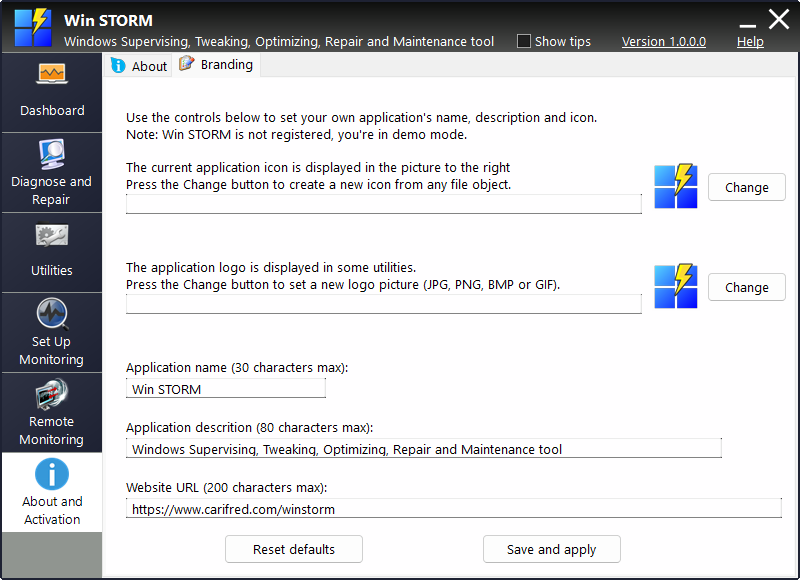
If you wish to change the application's icon, click the upper Change button, and indicate the desired icon to use. This can be any file object, Win STORM will use the icon associated with the file you choose.
To change the application's logo, which is displayed only in some of the utilities, press the lower Change button and indicate the location of the logo file to use. Valid file types are JPG, BMP, PNG and GIF.
Type in the desired application name, description, and website URL in the corresponding text fields.
When ready, click Save and apply. If you want to revert to the default settings, press Reset defaults.
