
Win STORM Help - Dashboard


Win STORM is in beta stage. While we're debugging the application, please report any bugs you find through our Contact form.
Win STORM's Dashboard page is the application's starting point. The upper part of the page displays some hardware and software information intended to help you quickly diagnose issues. In the center part, you have a drop down box with fixes to those eventual issues. Just select an item in that drop down box to immediately execute the selected fix. To reload the information fields, press Rescan system.
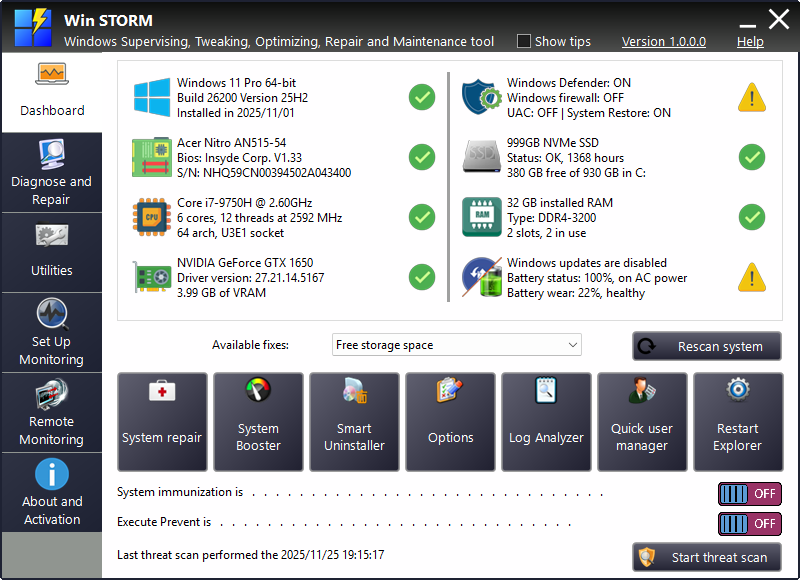
In the mid-lower part of the page you have a section where you can pin your most used utilities. To pin utilities here, go to the Utilities page, right-click the desired utility and select Pin to dashboard, from the context menu.
The utility's tile is automatically added to the first free slot starting from the left. You can pin up to seven utilities to the Dashboard.
To unpin an utility, right click its tile and select Unpin from Dashboard. The tile disappears, leaving a free slot for another utility.
Below the pinned utilities, you have two switches that let you easily turn the System Immunization and Execute Prevent functions on or off.
Toggle the desired switches. If the associated function has not yet been configured, the corresponding utility is launched, allowing you to set the function up for the first time.
Finally, at the bottom, a text label tells the date and time of the last threat scan, and the button to the right lets you start the same scan.
